Retab UI

is a shadcn registry for products where files, schemas, citations, and extracted data need to live in the same interface. Install the pieces you need as local React and Tailwind source, then adapt them inside your own design system.

The library focuses on the awkward surfaces generic UI kits usually skip: multi-format file rendering, OCR layout review, source-backed JSON fields, upload intake, thumbnail generation, schema editing, and workflow blocks for parse, extract, split, and partition results.

Project Map

  • Documentation:
  • Components:
  • Examples:
  • GitHub:
  • Registry namespace: @retab/*

Install One Surface

Add a registry item with the shadcn CLI:

bash
npx shadcn@latest add @retab/file-viewer

Render the generated component from your app:

tsx
import { FileViewerPreview } from "@/components/ui/file-viewer";
export default function Page() {  return (    <FileViewerPreview      className="h-[720px]"      source={{        kind: "url",        url: "/documents/statement.pdf",        fileName: "statement.pdf",        mimeType: "application/pdf",      }}    />  );}

The install writes source files into your repository. Keep the generated code as part of your app, and adjust aliases such as @/components/ui/file-viewer or @/components/blocks/ocr-block if your project uses a different layout.

Component Snapshots

Sources Viewer

Put extracted fields beside their evidence. PDF, image, text, CSV, Excel, and Word sources all use the same interaction model: focus a value, reveal the region, line, cell, or span behind it.
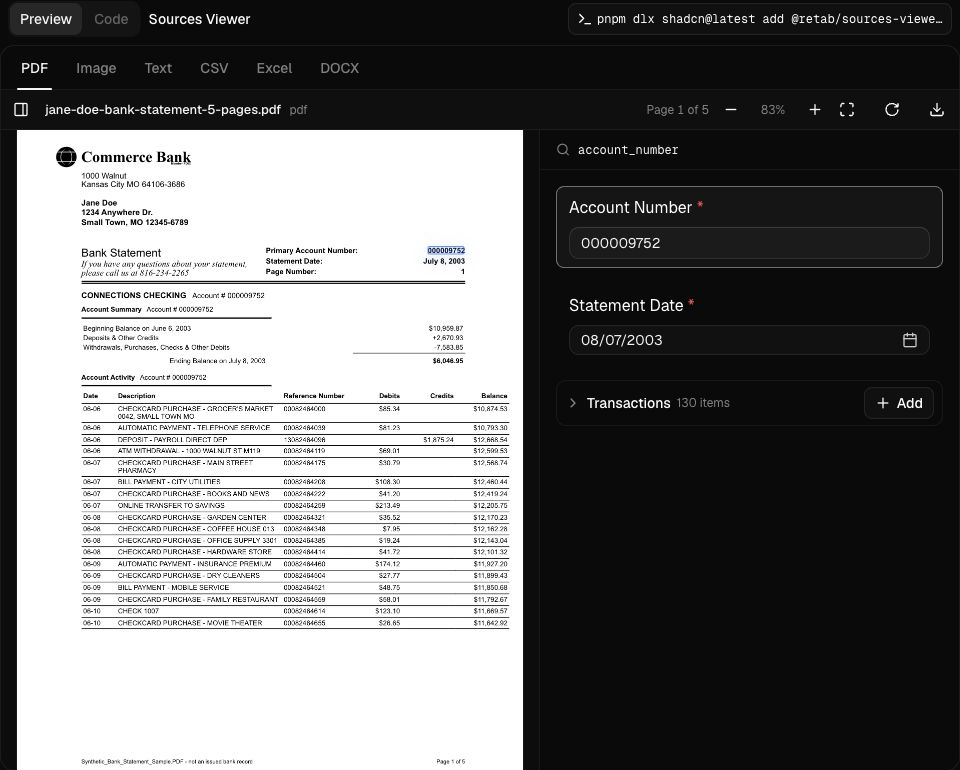
Sources Viewer component screenshot
bash
pnpm dlx shadcn@latest add @retab/sources-viewer-block
tsx
import { SourcesViewerBlock } from "@/components/blocks/sources-viewer-block";
export default function Page() {  return <SourcesViewerBlock />;}

OCR

Inspect OCR output as a document, not as raw provider JSON. The block pairs the page image with normalized text blocks, confidence metadata, and provider switching for Google Document AI, AWS Textract, and Azure Document Intelligence.
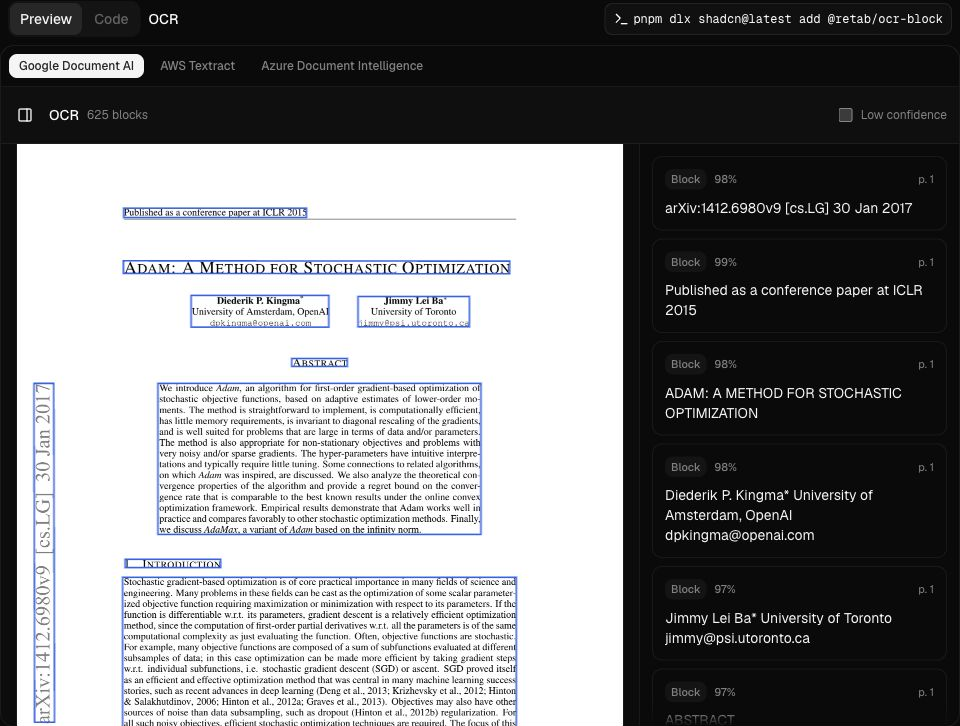
OCR component screenshot
bash
pnpm dlx shadcn@latest add @retab/ocr-block
tsx
import { OcrBlock } from "@/components/blocks/ocr-block";
export default function Page() {  return <OcrBlock />;}

File System

A document workspace over object-store manifests. List, grid, and column views share selection, lazy folders, generated thumbnails, and a persistent FileViewer preview.
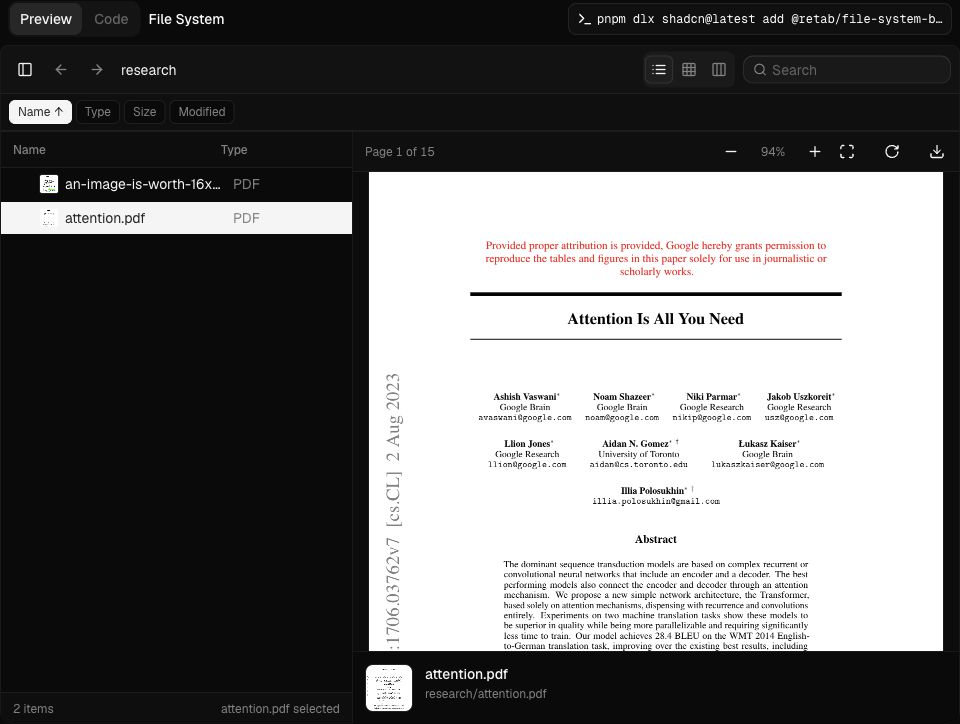
File System component screenshot
bash
pnpm dlx shadcn@latest add @retab/file-system-block
tsx
import { FileSystemBlock } from "@/components/blocks/file-system-block";
export default function Page() {  return <FileSystemBlock />;}

File Thumbnail

Preview files before users open them. The thumbnail frame accepts files, URLs, blobs, inline text, generated preview images, and custom preview content.
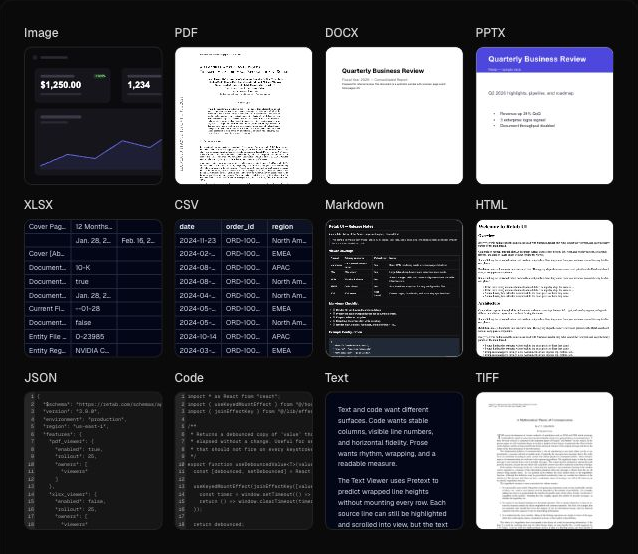
File Thumbnail component screenshot
bash
npx shadcn@latest add @retab/file-thumbnail
tsx
import { FileThumbnail } from "@/components/ui/file-thumbnail";
export function InvoiceThumbnail() {  return (    <FileThumbnail      thumbnailShape="square"      thumbnailSize="md"      source={{        kind: "url",        url: "/documents/invoice.pdf",        fileName: "invoice.pdf",        mimeType: "application/pdf",      }}    />  );}

Core Registry Items

bash
npx shadcn@latest add @retab/file-viewernpx shadcn@latest add @retab/pdf-viewernpx shadcn@latest add @retab/docx-viewernpx shadcn@latest add @retab/xlsx-viewernpx shadcn@latest add @retab/file-thumbnailnpx shadcn@latest add @retab/dropzonenpx shadcn@latest add @retab/schema-buildernpx shadcn@latest add @retab/data-cell

Workflow Blocks

bash
pnpm dlx shadcn@latest add @retab/sources-viewer-blockpnpm dlx shadcn@latest add @retab/ocr-blockpnpm dlx shadcn@latest add @retab/file-system-blockpnpm dlx shadcn@latest add @retab/parse-viewer-blockpnpm dlx shadcn@latest add @retab/split-viewer-blockpnpm dlx shadcn@latest add @retab/partition-viewer-blockpnpm dlx shadcn@latest add @retab/pdf-thumbnails-block

Run Locally

bash
pnpm installpnpm devpnpm registry:buildpnpm testpnpm typecheck

The docs app runs at http://localhost:3100.

Maintainers

Retab UI is built by .

License

Licensed under the MIT license [blocked].