nteract
nteract is a local-first notebook environment where humans, kernels, and AI agents can work against the same live document. It ships as a native desktop app with instant startup, realtime sync across windows and programmatic clients, and managed local environments.
Built on and .
Install
Download the latest release from .
Linux x64 and macOS (Apple silicon or Intel) can install with one command — the AppImage or signed .app bundle plus CLI/daemon and the per-user service (systemd or launchd) in one step:
macOS users can equally drag the DMG from GitHub Releases. DEB/RPM/APT
installs are not currently supported because runtimed is a per-user daemon
managed by the app and CLI, not by system package-manager scripts.
For remote workstations (Outerbounds, JupyterHub) that offer compute to hosted notebooks, use the headless one-liner — see Remote workstations [blocked]:
The desktop app bundles everything — runt CLI and runtimed daemon.
The runt CLI and runtimed Python bindings ship with the app and stay up to date automatically. For nightly builds, use runt-nightly instead.
What's in here
Runtime model
nteract stores notebook content in an Automerge-backed document and keeps live kernel state in an explicit runtime state document. The daemon owns kernel processes, execution queues, output capture, and the write path for execution results.
Execution requests name a synced cell_id; the daemon reads the cell source from the shared document, records queue and status changes in runtime state, and writes outputs through the same model. The desktop app, CLI, MCP server, and agent clients use that path, so programmatic control observes the same notebook state a human is editing.
MCP Server
The nteract MCP server connects AI assistants to Jupyter notebooks through the daemon. Agents can run code, read and write cells, manage dependencies, and collaborate with humans in real-time — watching the notebook update live in the desktop app while the agent works.
Install the Codex plugin
Restart Codex, then open the plugin directory, choose the nteract marketplace, and install nteract.
The distribution repository also includes a nightly plugin entry for pre-release builds.
If Codex still does not show notebook tools after restarting, refresh the marketplace and reinstall the selected plugin:
Start a new Codex session after reinstalling; running sessions do not hot-load newly installed MCP tools.
Install the Claude Code plugin
Pin a specific version:
The plugin ships the right nteract-mcp binary for your platform (macOS arm64/x64, Linux x64, Windows x64) — no separate install needed. main of nteract/agent-plugins always points at the latest stable release.
For pre-release builds (updated daily):
Install in Claude Desktop
If you use the nteract desktop app with Claude Desktop, there's a one-click install path. In the menu bar, choose nteract → Install Extension for Claude...
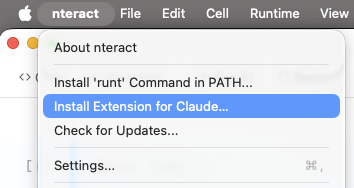
The desktop app builds a .mcpb bundle at runtime (manifest, icons, nteract-mcp binary) and hands it to Claude Desktop, which prompts you to confirm the install. Requires the nteract desktop app; Claude Desktop picks up the bundle from there.
Usage
List open notebooks with kernel and environment info:
Project structure
Development
Prerequisites
Linux only: Install GTK/WebKit dev libraries:
Quick start
Development workflows
cargo xtask dev installs dependencies, ensures generated artifacts, starts the
per-worktree dev daemon, waits for it to be ready, and then launches the notebook
app with hot reload. It stops the daemon it started when the app exits. For repeat
launches, use cargo xtask dev --skip-install --skip-build.
On macOS, every worktree gets a cached app wrapper with a distinct name and bundle
identifier, such as nteract Dev f0f9d9 and
org.nteract.desktop.dev.f0f9d99b161f. This keeps unsigned source builds separate
from installed stable and Nightly apps without changing release packaging or
claiming .ipynb file associations. Use cargo xtask dev status to obtain the
live automation PID. Accessibility scripts should select the System Events process
by that PID instead of asking LaunchServices for an app named nteract:
Frontend edits continue through Vite hot reload. After changes to Tauri bootstrap
or event-listener setup, use cargo xtask dev --fresh to terminate only this
worktree's exact app process, stop its daemon, and relaunch both cleanly. The
equivalent manual sequence is cargo xtask dev reset followed by
cargo xtask dev.
Build order
The UI must be built before Rust because crates/notebook embeds assets from apps/notebook/dist/ via Tauri.
Common commands
Library crates
The underlying Rust libraries are published to crates.io:
- — Jupyter messaging protocol
- - Jupyter kernel interactions over ZeroMQ
- — Notebook parsing
Contributing
See AGENTS.md for the subsystem map and development guidance. Key entry points:
crates/runtimed/AGENTS.md— architecture, daemon, state ownershipapps/notebook/src/AGENTS.md— frontend architecturecrates/notebook-wire/AGENTS.md— wire protocolcargo xtask help— all build commands
License
BSD-3-Clause